return {
  {
    "benlubas/molten-nvim",
    version = "^1.0.0", -- use version <2.0.0 to avoid breaking changes
    dependencies = { "3rd/image.nvim" },
    build = ":UpdateRemotePlugins",
    init = function()
      local function getenv(var)
        local v = os.getenv(var)
        if v == nil then
          return ""
        else
          return v
        end
      end
      -- vim.g.python3_host_prog=vim.fn.expand("")
      vim.g.python3_host_prog = getenv("WORKON_HOME") .. "/neovim/bin/python3"

      -- I find auto open annoying, keep in mind setting this option will require setting
      -- a keybind for `:noautocmd MoltenEnterOutput` to open the output again
      vim.g.molten_auto_open_output = false

      -- this guide will be using image.nvim
      -- Don't forget to setup and install the plugin if you want to view image outputs
      vim.g.molten_image_provider = "image.nvim"

      -- optional, I like wrapping. works for virt text and the output window
      vim.g.molten_wrap_output = true

      -- Output as virtual text. Allows outputs to always be shown, works with images, but can
      -- be buggy with longer images
      vim.g.molten_virt_text_output = true

      -- this will make it so the output shows up below the \`\`\` cell delimiter
      vim.g.molten_virt_lines_off_by_1 = true
      -- these are examples, not defaults. Please see the readme
      vim.g.molten_image_provider = "image.nvim"
      vim.g.molten_output_win_max_height = 20
      vim.keymap.set("n", "<localleader>mi", ":MoltenInit<CR>", { silent = true, desc = "Initialize the plugin" })
      vim.keymap.set(
        "n",
        "<localleader>e",
        ":MoltenEvaluateOperator<CR>",
        { silent = true, desc = "run operator selection" }
      )
      vim.keymap.set("n", "<localleader>rl", ":MoltenEvaluateLine<CR>", { silent = true, desc = "evaluate line" })
      vim.keymap.set("n", "<localleader>rr", ":MoltenReevaluateCell<CR>", { silent = true, desc = "re-evaluate cell" })
      vim.keymap.set(
        "v",
        "<localleader>rv",
        ":<C-u>MoltenEvaluateVisual<CR>gv",
        { silent = true, desc = "evaluate visual selection" }
      )
      vim.keymap.set("n", "<localleader>rd", ":MoltenDelete<CR>", { silent = true, desc = "molten delete cell" })
      vim.keymap.set("n", "<localleader>oh", ":MoltenHideOutput<CR>", { silent = true, desc = "hide output" })
      vim.keymap.set(
        "n",
        "<localleader>os",
        ":noautocmd MoltenEnterOutput<CR>",
        { silent = true, desc = "show/enter output" }
      )
      -- if you work with html outputs:
      vim.keymap.set(
        "n",
        "<localleader>mx",
        ":MoltenOpenInBrowser<CR>",
        { desc = "open output in browser", silent = true }
      )
      -- automatically import output chunks from a jupyter notebook
      -- tries to find a kernel that matches the kernel in the jupyter notebook
      -- falls back to a kernel that matches the name of the active venv (if any)
      local imb = function(e) -- init molten buffer
        vim.schedule(function()
          local kernels = vim.fn.MoltenAvailableKernels()
          local try_kernel_name = function()
            local metadata = vim.json.decode(io.open(e.file, "r"):read("a"))["metadata"]
            return metadata.kernelspec.name
          end
          local ok, kernel_name = pcall(try_kernel_name)
          if not ok or not vim.tbl_contains(kernels, kernel_name) then
            kernel_name = nil
            local venv = os.getenv("VIRTUAL_ENV") or os.getenv("CONDA_PREFIX")
            if venv ~= nil then
              kernel_name = string.match(venv, "/.+/(.+)")
            end
          end
          if kernel_name ~= nil and vim.tbl_contains(kernels, kernel_name) then
            vim.cmd(("MoltenInit %s"):format(kernel_name))
          end
          vim.cmd("MoltenImportOutput")
          vim.cmd("QuartoActivate")
        end)
      end

      -- automatically import output chunks from a jupyter notebook
      vim.api.nvim_create_autocmd("BufAdd", {
        pattern = { "*.ipynb" },
        callback = imb,
      })

      -- we have to do this as well so that we catch files opened like nvim ./hi.ipynb
      vim.api.nvim_create_autocmd("BufEnter", {
        pattern = { "*.ipynb" },
        callback = function(e)
          if vim.api.nvim_get_vvar("vim_did_enter") ~= 1 then
            imb(e)
          end
        end,
      })
      -- automatically export output chunks to a jupyter notebook on write
      vim.api.nvim_create_autocmd("BufWritePost", {
        pattern = { "*.ipynb" },
        callback = function()
          if require("molten.status").initialized() == "Molten" then
            vim.cmd("MoltenExportOutput!")
          end
        end,
      })

      -- Provide a command to create a blank new Python notebook
      -- note: the metadata is needed for Jupytext to understand how to parse the notebook.
      -- if you use another language than Python, you should change it in the template.
      local default_notebook = [[
          {
          "cells": [
          {
            "cell_type": "markdown",
            "metadata": {},
            "source": [
              ""
            ]
          }
          ],
          "metadata": {
          "kernelspec": {
            "display_name": "Python 3",
            "language": "python",
            "name": "python3"
          },
          "language_info": {
            "codemirror_mode": {
              "name": "ipython"
            },
            "file_extension": ".py",
            "mimetype": "text/x-python",
            "name": "python",
            "nbconvert_exporter": "python",
            "pygments_lexer": "ipython3"
          }
          },
          "nbformat": 4,
          "nbformat_minor": 5
        }
      ]]

      local function new_notebook(filename)
        local path = filename .. ".ipynb"
        local file = io.open(path, "w")
        if file then
          file:write(default_notebook)
          file:close()
          vim.cmd("edit " .. path)
        else
          print("Error: Could not open new notebook file for writing.")
        end
      end

      vim.api.nvim_create_user_command("NewNotebook", function(opts)
        new_notebook(opts.args)
      end, {
        nargs = 1,
        complete = "file",
      })
    end,
  },
  { -- requires plugins in lua/plugins/treesitter.lua and lua/plugins/lsp.lua
    -- for complete functionality (language features)
    "quarto-dev/quarto-nvim",
    ft = { "quarto", "markdown" },
    dev = false,
    config = function()
      require("quarto").setup({
        lspFeatures = {
          -- NOTE: put whatever languages you want here:
          languages = { "r", "python", "rust" },
          chunks = "all",
          diagnostics = {
            enabled = true,
            triggers = { "BufWritePost" },
          },
          completion = {
            enabled = true,
          },
        },
        keymap = {
          -- NOTE: setup your own keymaps:
          hover = "H",
          definition = "gd",
          rename = "<leader>rn",
          references = "gr",
          format = "<leader>gf",
        },
        codeRunner = {
          enabled = true,
          default_method = "molten",
        },
      })
      local runner = require("quarto.runner")
      vim.keymap.set("n", "<localleader>rc", runner.run_cell, { desc = "run cell", silent = true })
      vim.keymap.set("n", "<localleader>ra", runner.run_above, { desc = "run cell and above", silent = true })
      vim.keymap.set("n", "<localleader>rA", runner.run_all, { desc = "run all cells", silent = true })
      vim.keymap.set("n", "<localleader>rl", runner.run_line, { desc = "run line", silent = true })
      vim.keymap.set("v", "<localleader>r", runner.run_range, { desc = "run visual range", silent = true })
      vim.keymap.set("n", "<localleader>RA", function()
        runner.run_all(true)
      end, { desc = "run all cells of all languages", silent = true })
      require("nvim-treesitter.configs").setup({
        -- ... other ts config
        textobjects = {
          move = {
            enable = true,
            set_jumps = false, -- you can change this if you want.
            goto_next_start = {
              --- ... other keymaps
              ["]b"] = { query = "@code_cell.inner", desc = "next code block" },
            },
            goto_previous_start = {
              --- ... other keymaps
              ["[b"] = { query = "@code_cell.inner", desc = "previous code block" },
            },
          },
          select = {
            enable = true,
            lookahead = true, -- you can change this if you want
            keymaps = {
              --- ... other keymaps
              ["ib"] = { query = "@code_cell.inner", desc = "in block" },
              ["ab"] = { query = "@code_cell.outer", desc = "around block" },
            },
          },
          swap = { -- Swap only works with code blocks that are under the same
            -- markdown header
            enable = true,
            swap_next = {
              --- ... other keymap
              ["<leader>sbl"] = "@code_cell.outer",
            },
            swap_previous = {
              --- ... other keymap
              ["<leader>sbh"] = "@code_cell.outer",
            },
          },
        },
      })
    end,
    dependencies = {
      -- for language features in code cells
      -- configured in lua/plugins/lsp.lua and
      -- added as a nvim-cmp source in lua/plugins/completion.lua
      "jmbuhr/otter.nvim",
      "nvim-treesitter/nvim-treesitter",
    },
  },
  {
    "GCBallesteros/jupytext.nvim",
    opts = {
      style = "markdown",
      output_extension = "md",
      force_ft = "markdown",
    },
  },
  { -- preview equations
    "jbyuki/nabla.nvim",
    keys = {
      { "<leader>qm", ':lua require"nabla".toggle_virt()<cr>', desc = "toggle [m]ath equations" },
    },
  },
  -- {
  --   "nvim-lualine/lualine.nvim",
  --   dependencies = {
  --     "benlubas/molten-nvim",
  --   },
  --   event = "VeryLazy",
  --   opts = function(_, opts)
  --     table.insert(opts.sections.lualine_y, {
  --       require("molten.status").kernels(),
  --     })
  --   end,
  -- },
  {
    -- see the image.nvim readme for more information about configuring this plugin
    "3rd/image.nvim",
    opts = {
      backend = "kitty", -- whatever backend you would like to use
      processor = "magick_cli", -- or "magick_cli"
      max_width = 100,
      max_height = 12,
      max_height_window_percentage = math.huge,
      max_width_window_percentage = math.huge,
      window_overlap_clear_enabled = true, -- toggles images when windows are overlapped
      window_overlap_clear_ft_ignore = { "cmp_menu", "cmp_docs", "" },
    },
  },
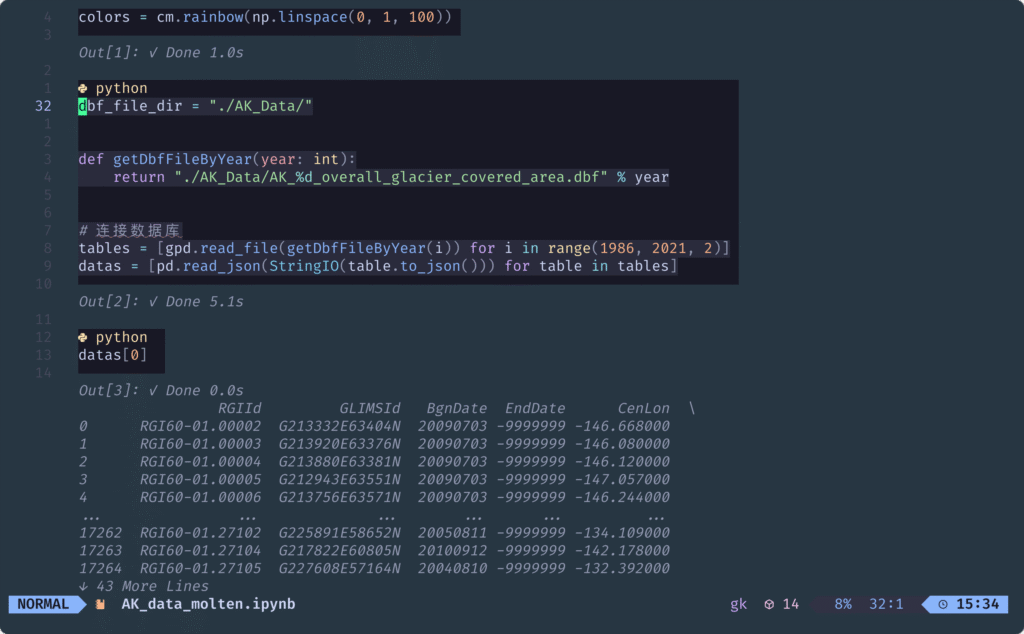
}
如何让neovim 集成 jupyter
声明: 本文采用 BY-NC-SA 协议进行授权,如无注明均为原创,转载请注明转自 九仞之行
本文标题: 如何让neovim 集成 jupyter
本文作者: Styunlen
本文地址: https://styunlen.cn/archives/post-1711.html
本文标题: 如何让neovim 集成 jupyter
本文作者: Styunlen
本文地址: https://styunlen.cn/archives/post-1711.html
暂无评论


